AlphaClipper keeps every snippet, code block, and screen capture right where it belongs—stored permanently and privately on your local Windows PC.
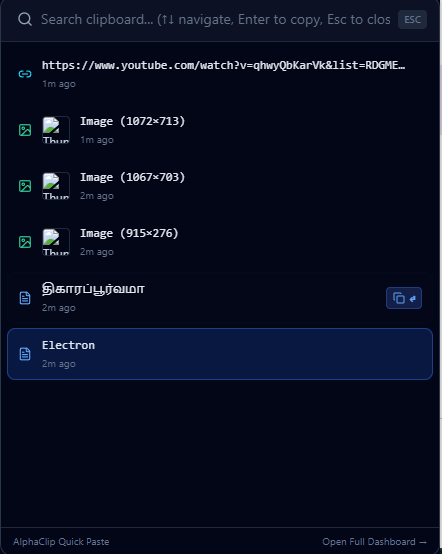
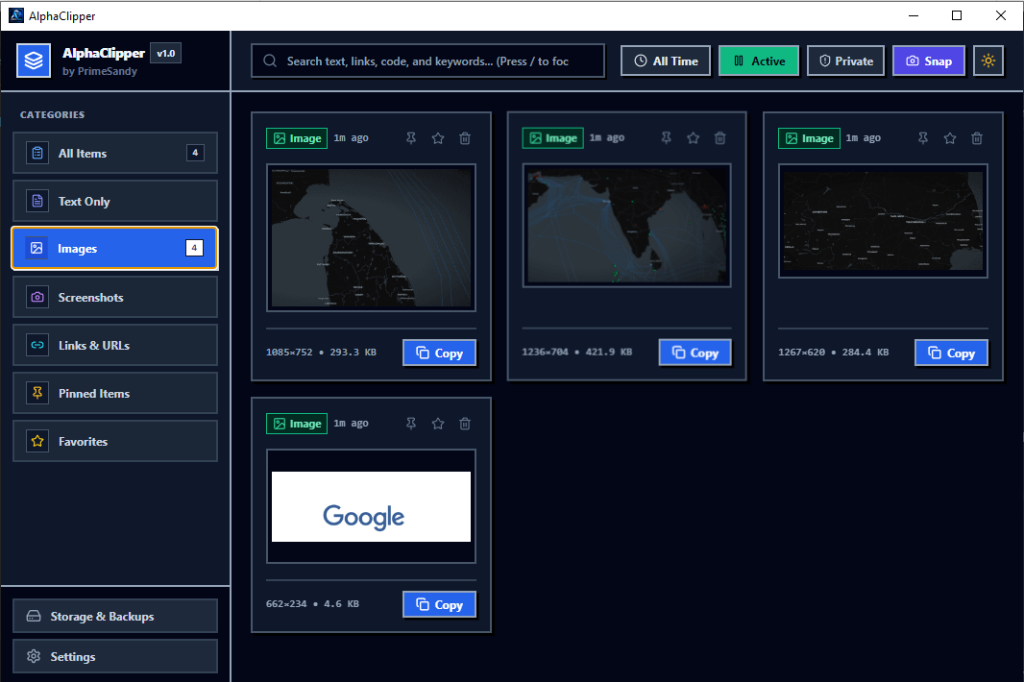
Explore the authentic AlphaClipper desktop experience. View the full-featured clipboard dashboard and the instantaneous hotkey quick-paste popup.
 AlphaClipper v1.0 by PrimeSandy — Desktop Dashboard
Standard Windows clipboard history resets on restart and offers basic retention. AlphaClipper is architected with persistent local storage and built-in screen capture.
Never lose copied content after a Windows reboot. Snippets and image captures are stored in a persistent local database residing entirely on your personal storage drive.
Core ArchitectureFind text, URLs, terminal commands, and notes from hours or days ago with real-time keyword indexing and sub-millisecond query responses.
Fast FilteringCapture active windows or custom rectangular regions with a unified hotkey. Screen clippings automatically enter your clipboard stream without clunky third-party apps.
Integrated CapturePin frequently used boilerplate code, email templates, shell scripts, and documentation links to keep them permanently accessible at the top of your list.
Productivity PinningOperate at the speed of thought. Summon the manager with a customizable global shortcut, cycle with arrow keys, and paste directly into any active application.
Global HotkeysYour clipboard data contains confidential passwords, personal tokens, and private messages. AlphaClipper performs all indexing on your device without cloud telemetry.
Local FirstUnlike cloud-connected clipboard managers that synchronize sensitive text to external servers, AlphaClipper operates strictly as an isolated, offline Windows client.
%APPDATA%.Official 64-bit installer with persistent local SQLite clipboard history, instantaneous screen capture, and 100% offline data privacy.
Choose between standard Windows installation or building directly from source.
For end users wanting a ready-to-run desktop application once release builds publish.
Visit the official Releases page to download the latest setup binary or portable archive.
Check the published SHA-256 checksum against your downloaded file to confirm an authentic build.
Execute the installer wizard to place AlphaClipper in your program directory, or extract the portable folder.
Launch AlphaClipper, verify your tray icon appears, and press Ctrl + Shift + V to access your clipboard history.
Clone the repository and inspect or compile the application locally.
git clone https://github.com/PrimeSandy/AlphaClipper.git
cd AlphaClipper
git status && git branch -a
CONTRIBUTING.md before creating branches or submitting pull requests.
AlphaClipper is an open-source initiative built in the open. Whether you are improving Windows API hooks, refining the screenshot engine, enhancing documentation, or submitting bug reports—contributions of every scale are welcome.
AlphaClipper is 100% free and open source. Your sponsorship directly backs independent software development, Windows binary code signing, and continuous improvements.
Support independent open-source development of AlphaClipper. Every coffee fuels new Windows features, local SQLite optimizations, and continuous updates.
Giving AlphaClipper a star on GitHub is 100% free and drastically boosts visibility across the open-source Windows community.
From UI enhancements to Win32 clipboard hooks and language translations, all contributions are warmly welcomed through pull requests.
Everything you need to know about AlphaClipper, storage, and platform support.
%APPDATA%/AlphaClipper/). AlphaClipper does not transmit your clipboard data over the internet or send it to third-party cloud servers.
AlphaClipper-Setup-1.0.0-x64.exe) or portable archive from the GitHub Releases page.
%APPDATA%/AlphaClipper.